
dbus-esphome — Native ESPHome Integration for Victron Systems
dbus-esphome runs on Venus OS (e.g. Cerbo GX), showing ESPHome switches and sensors natively in the Victron GUI & Remote Console.
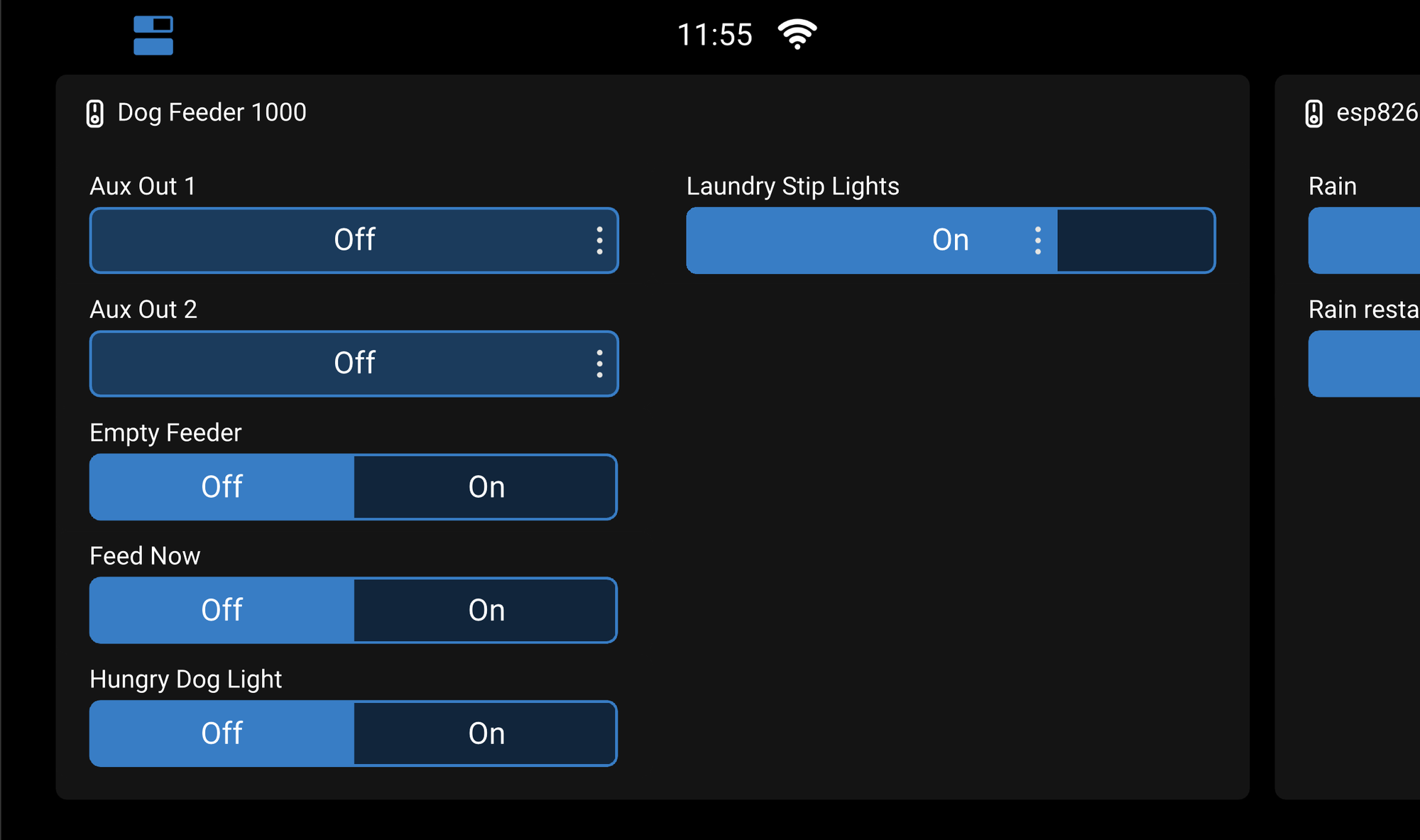
dbus-esphome runs on Venus OS (e.g. Cerbo GX), showing ESPHome switches and sensors natively in the Victron GUI & Remote Console.
| Status | Early testing |
| Platform | Victron GX (Cerbo GX, Venus GX, Ekrano GX, Pi 4) / Venus OS v3.7+ |
| Language | Python |
| Year | 2026 |
| Source | GitHub — elliot-alfirevich/dbus-esphome |
If you run a Victron energy system and want to pull in readings or control loads via ESPHome devices from the Victron Venus OS GUIv2 without needing NodeRED in the middle - this is for you. It's a driver that sits on your GX device and connects ESPHome devices directly to the Victron dbus — no Home Assistant or NodeRED in the middle.
Victron have their own dbus-shelly module - which this is modelled on.
What problem does this solve?
Victron's energy ecosystem is excellent for boats, 4x4s, off-grid buildings, you name it!
The ability to easily control individual loads from the one Victron touchscreen is what I was seeking for years... Venus GUIv2 was a gamechanger - with it's ability to natively add custom defined switches to the GUI.
The GX device — a Cerbo GX with Touch 50 in my case — runs Venus OS underneath, a Linux-based system that communicates with all attached ESPHome devices over D-Bus.
Inverters, chargers, solar controllers, tank sensors: everything that Victron sells speaks this D-Bus protocol natively. Third-party integration and python libraries are possible, but it's not trivial. You need to register your device as a valid D-Bus service with the right service name, the right paths, and the right values — or Venus OS will simply ignore you.
ESPHome is super flexible and can be installed on many commercial off-the-shelf devices, or custom made modules. It's an open, flexible firmware platform for ESP32, ESP8266 and other IOT microcontrollers. You describe your device in a YAML file — sensors, switches, lights, binary inputs — and ESPHome compiles it into firmware. The native API it exposes is the same one Home Assistant uses, and it's encrypted and fast. But it knows nothing about Victron's D-Bus.
I wanted to be able to manage everything in my 4x4 from the Victron touchscreen. I have a custom-built ESP32 boards with relays, current sensors, temperature sensors, and a dimmable LED strip. I also wanted all of that to appear in the Venus OS Remote Console — controllable from the same screen I use to manage my batteries and solar. Building a one-off integration seemed wasteful; I wanted something generic that any ESPHome device could plug into.
How it works
The driver runs as a persistent background service on the GX device, managed by daemontools (the same supervisor Venus OS uses for its own services). At startup it reads a config file listing your ESPHome devices — just an IP address and an API encryption key per device — and connects to each one using the native ESPHome API on port 6053.
The moment a connection is established, it discovers every entity the device exposes: switches, lights, sensors, binary sensors. For each one it registers the appropriate Venus OS D-Bus service. From that point on, state changes flow in both directions without any polling:
- When the ESPHome device reports a change — a sensor reading updates, a switch state changes — the driver immediately updates the corresponding D-Bus path.
- When you toggle a switch or adjust a brightness slider in the Venus OS GUI, the driver sends the command back to the ESPHome device via the native API.
No polling. No HTTP round-trips. The connection is persistent and encrypted.
If a device drops off the network, the driver keeps its D-Bus services registered but marks them as disconnected. Venus OS shows the device as offline rather than removing it from the GUI, which is the correct behaviour. Reconnection happens automatically every 30 seconds.
What you see in the GUI
Different ESPHome entity types map to different Venus OS service types:
Switches and lights appear as switch tiles in the Venus OS overview. Dimmable lights — like an LED strip with brightness control — show up with a brightness slider alongside the on/off toggle. The driver detects dimmable capability automatically from the ESPHome API.
Temperature sensors appear as temperature tiles, the same as any Victron-compatible temperature probe.
Numeric sensors — current, voltage, analog inputs — appear as tank level tiles, with the raw value scaled to a 0–100% level. This is a pragmatic choice: Venus OS has no generic numeric sensor type, but tank tiles are flexible and work well for displaying arbitrary measurements. The raw value and unit are stored alongside the percentage so you can read the actual figure if you need it.
Binary sensors appear as read-only indicators on the switch service.
Entity names come directly from the ESPHome YAML name: field, so what you call the entity there is what appears in the GUI. No extra configuration needed.
A concrete example
My test device is a custom ESP32-S3 board — a CAN-IO module I designed with four relays, six smart switches, six current sensors, two temperature sensors, and a NeoPixel strip. Before this driver, reading any of that in the Venus OS Remote Console meant a detour through NodeRED and MQTT integration I was never fully happy with.
With dbus-esphome running, the board appears directly in Venus OS. The relays and switches show up on a switch tile. The current sensors appear as tank levels — "Current Draw" and "Battery Voltage" scaled to the ranges I configured. The two temperature sensors get their own tiles. And the NeoPixel strip, which ESPHome exposes as a dimmable light, shows a brightness slider in the GUI that controls the strip in real time.
The dimmable detection was one of the trickier parts to get right. Newer versions of the ESPHome API replaced a simple supports_brightness flag with a supported_color_modes list using bitmasks. The driver checks both formats, so it works whether your ESPHome device is old or new.
Multiple devices
Any number of ESPHome devices can be connected simultaneously. Each gets its own section in config.ini, and each runs as an independent connection task sharing a single process. Services from different devices don't conflict because the device name is embedded in the D-Bus service name — so com.victronenergy.switch.esphome_laundry_board and com.victronenergy.switch.esphome_engine_room coexist cleanly.
Installation
The installer is designed to run directly on the GX device over SSH with minimal prerequisites.
# Copy the driver folder to the GX device
scp -r dbus-esphome/ root@<gx-ip>:/tmp/

# SSH in and run the installer
ssh root@<gx-ip>
bash /tmp/dbus-esphome/install.sh
The installer downloads its Python dependencies directly onto the GX device — no pip required, no Python environment to manage. It creates a daemontools service and adds a hook to /data/rc.local so the service survives Venus OS firmware updates. Dependencies live under /data/ for the same reason.
If your GX device doesn't have internet access, there's an offline path: fetch-deps.sh uses Docker on your computer to build a dependency bundle for the correct architecture and Python version, then you copy that bundle across with the driver.
After installing, edit /data/dbus-esphome/config.ini with your device addresses and encryption keys, then start the service:
svc -u /service/dbus-esphome
Entities should appear in the Remote Console within a few seconds.
Current state
The project is brand new and I'm actively testing it. Switches, dimmable lights, temperature sensors, and tank-level sensors all work on my hardware. I'd call it functional but rough around the edges — connection handling and entity discovery are solid, and the GUI integration behaves correctly, but there are still rough edges around some entity types and configuration options.
The source is on GitHub and I'm very happy to hear about what works, what doesn't, and what entity types would be most useful to support next. If it saves you the same frustration it saved me, that's the goal.
